Claude Code for Business Owners: The Complete Beginner's Guide (No Coding Required)
Every Claude Code tutorial is built for developers. This one is built for business owners who want to automate real work - not build demo apps. Real examples from our agency, step-by-step setup, and three paths to get started.

Skip the read. Chat with this article.
Claude Code is an AI tool that works inside your computer - reading your files, connecting to your business tools, and executing tasks autonomously. Unlike ChatGPT where you ask a question and copy-paste the answer, Claude Code sits at your desk and does the work. This guide covers everything a business owner needs to know - what it is, how to think about it, and how we use it daily at Automindz to run a 40+ client agency with a team of six.
My co-founder Fabian recently broke this down in a video that covers the fundamentals. If you're more of a visual learner, watch this first - then come back for the deeper breakdown with real examples from our agency.
What Is Claude Code (And Why It Changes Everything for Business Owners)
There is a mental model that makes Claude Code click for every business owner I have explained it to.
ChatGPT is a smart friend you call for advice. You ask a question, get a solid answer, and then you go do the work yourself. If you need code, you copy it. If something breaks, you copy the error, go back, get a new answer. You are still doing all the heavy lifting.
Claude Code is that same friend sitting at your desk, typing on your keyboard, and doing the work for you.
It operates inside your project. It sees all your files, writes code directly where it needs to go, runs tests, identifies problems, and fixes them - all in the same session. You describe what you want in plain English, and it builds it. This is what people mean when they talk about "vibe coding" - a term coined by Andrej Karpathy that basically describes building software through conversation rather than through writing code yourself. 92% of US developers have adopted some version of this practice, but the real opportunity is for non-developers who could never build these tools before.
46%
of developers named Claude Code their most loved AI coding tool
Source: Pragmatic Engineer Survey 2026When Claude Code first came out and Fabian tried it on a real client project, he immediately knew it was different. It navigated the entire codebase, found bugs, and fixed them in the same session without him having to interrupt or explain what was happening. That was the moment we decided to go all-in on Claude for everything we build at Automindz.
The timing is significant. The AI implementation services market is growing from $7.63 billion in 2026 to a projected $50.31 billion by 2030 - a 45.8% annual growth rate. Businesses are not asking whether they should use AI anymore. They are asking how to actually implement it. Claude Code is the tool that closes that gap between intent and execution.
How Is Claude Code Different From ChatGPT and Cursor?
This is the question every business owner asks first, and the answer matters because each tool serves a fundamentally different purpose.
ChatGPT is a smart advisor. You ask questions, it answers. You still do the work. It cannot access your files, run your tools, or execute anything on your machine. For quick research, brainstorming, and short-form writing, it is excellent. For building systems - it stops at advice.
Cursor is an accelerator. It is a code editor (built on VS Code) with AI baked in. You write code faster because AI auto-completes and suggests. But you are still the driver - Cursor just gives you a really powerful GPS. Best for developers who want to move faster in their existing workflow.
Claude Code is a delegator. You describe what you want in plain English, and it builds the thing. It reads your files, creates new ones, runs commands, connects to your tools, and iterates on its own when something breaks. You are not driving - you hired a driver who already knows the route.
| Feature | ChatGPT | Cursor | Claude Code |
|---|---|---|---|
| File system access | No | Yes (editor) | Yes (full system) |
| Tool connections (MCP) | Limited plugins | Limited | 100+ via MCP |
| Autonomous execution | No | Partial | Full |
| Persistent memory | Conversation only | Project-level | CLAUDE.md + auto-memory |
| Best for | Research, advice | Coding faster | Building systems |
| Non-developer friendly | Yes | Not really | Yes |
The honest truth: most business owners I talk to are using ChatGPT as a slightly better Google. They ask questions, get answers, and manually implement. That is the old model. Claude Code lets you skip the manual implementation entirely.
For recruitment agency owners specifically, I wrote a deeper technical breakdown of what Claude Code makes possible - you can read the full deep dive here.
The 4 Concepts You Need Before You Start
The biggest mistake people make with Claude Code is opening it and prompting right away. They treat it like a smarter chatbot. Sometimes that works fine. Most of the time, Claude goes in a direction you did not intend because it has no context about you, your business, or what you are trying to achieve.
Four concepts change everything. Each one takes minutes to understand, but together they turn Claude Code from a random chatbot into a system that knows your business and gets better every session.
CLAUDE.md - Your Briefing Document
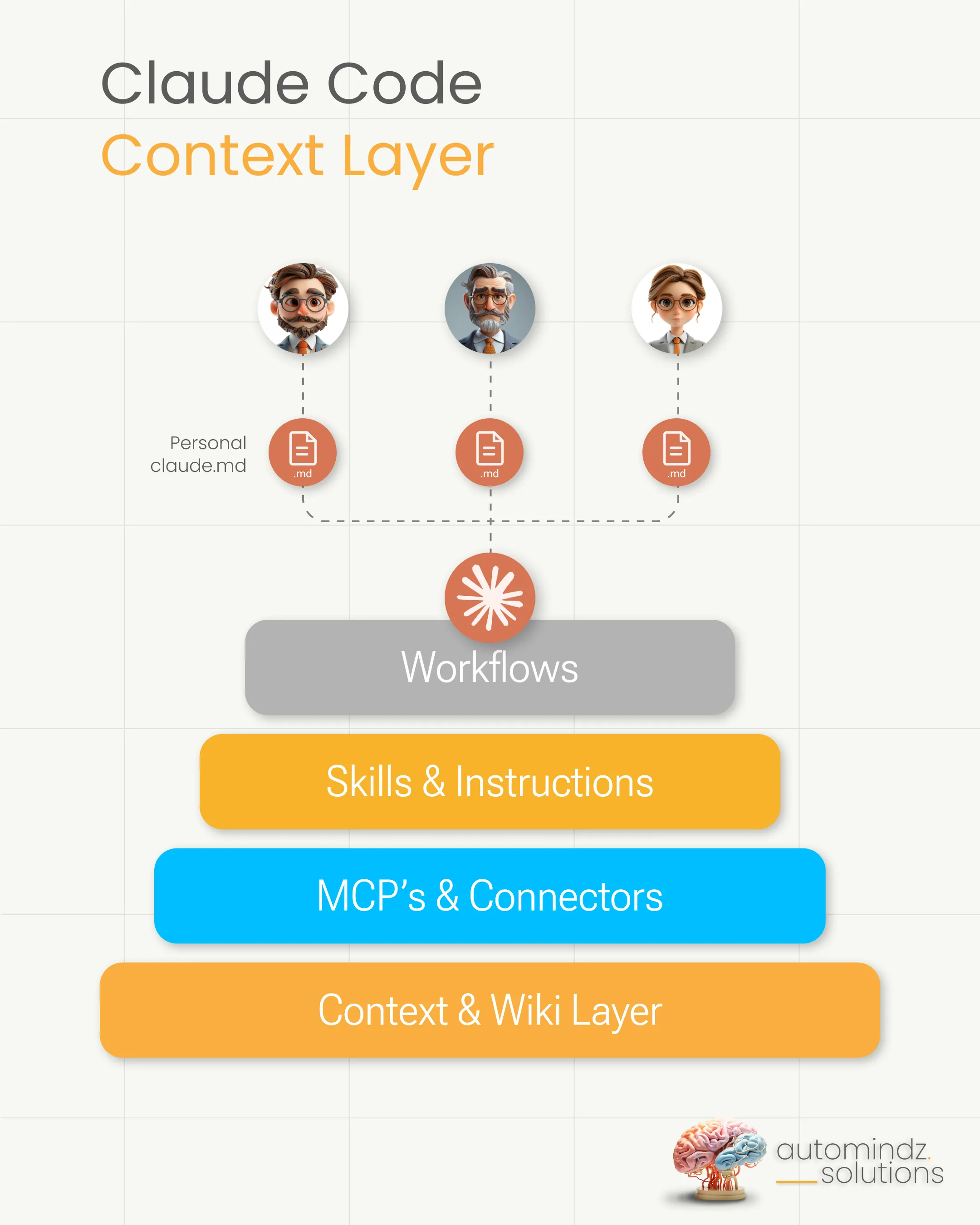
This is the single most important file when working with Claude Code. Think of it as a briefing document that Claude reads at the start of every conversation. It tells Claude who you are, what your business does, what tools it has access to, what conventions to follow, and what the project is about.
Without a good CLAUDE.md, every session starts from zero. Claude does not know your business, your preferences, or your standards. With a well-written one, Claude shows up every time already understanding your context.
At Automindz, our CLAUDE.md is the backbone of everything. It includes our team structure, our product lines, our 10+ connected tools, our content voice rules, and our operational conventions. Every session builds on top of that foundation.
The easiest way to write your first CLAUDE.md is to use Claude's voice mode. Talk for 10 minutes about your business - who you serve, what tools you use, how you operate, what matters to you. Then ask Claude to draft the file based on what you said. From the official Anthropic documentation: keep it under 200 lines, use markdown headers and bullets, be specific ("use 2-space indentation" not "format code properly"), and run /init to auto-generate a starting template.
CLAUDE.md files also follow a hierarchy. Your personal file at ~/.claude/CLAUDE.md applies to all your projects. A project-level file at ./CLAUDE.md applies to that specific project. Think of it like a company handbook versus a department handbook. The company handbook (your personal file) applies to everything you do regardless of which project you are working on - your communication style, your preferred tools, your name and role. The department handbook (project-level file) adds rules specific to that project - the tech stack, the client context, the delivery conventions. Claude reads both, so your general preferences travel with you while project-specific rules stay where they belong.
Skills - SOPs for AI
Once you find yourself repeating the same task with Claude - researching a prospect, drafting a follow-up, building a report - you turn it into a Skill.
A Skill is a markdown file that defines exactly what inputs to expect, what tools to use, what process to follow, and what the output should look like. You invoke it with a slash command, like /morning-briefing or /generate-proposal. It is basically a standard operating procedure that Claude executes for you.
“Once you have repeatable tasks - prospect enrichment, candidate shortlisting, client report generation - you turn them into Skills. Markdown files that define the process. Then you invoke them with a slash command.”
Here is what makes skills powerful: they live as simple text files in a dedicated folder on your computer (.claude/skills/). Think of it as a recipe binder. Each recipe lives in its own file, and Claude knows exactly where to find the binder and reads the recipe every time you ask it to cook. No code required to create them - if you have ever written a Google Doc with headings and bullet points, you already know how to write these files. You write instructions in plain English, add some structure (what inputs, what tools, what output), and Claude follows them every time.
Skills can also gather fresh information before they start working. Imagine a receptionist who checks today's calendar, pulls the guest list, and reads the latest CRM notes before greeting a visitor. A skill does the same thing - it pulls live data from your connected tools before executing, so it always has the most current information.
We run over 50 production skills at Automindz. Each one started as a task we kept doing manually. Now they run on command, producing consistent output every time.
MCP Servers - Connecting Your Tools
MCP stands for Model Context Protocol. Think of it as USB-C for AI - a standardized way to connect Claude Code to external tools and data sources.
Your CRM, database, calendar, email, project management tool - if it has an MCP server, Claude can read from it, write to it, and work with the data directly. No API keys to manage, no custom code to write. You run one command:
claude mcp add --transport http notion https://mcp.notion.com/mcp
It looks technical, but it is a one-time copy-paste. Like entering a Wi-Fi password - you do it once, and from that point on your device is connected. Same idea here: run the command once, and Claude can access that tool from every session going forward. The same pattern works for Supabase, Stripe, Google Analytics, Gmail, Slack, and hundreds more.
At Automindz, we have 10+ MCP servers connected. Claude can pull data from our CRM (Attio), query our databases (Supabase), check website analytics (GA4), read call transcripts (Fathom), enrich LinkedIn profiles, and send outreach through Lemlist. The moment we connected our tools, Claude went from a smart assistant to an operational team member.
Disclosure: hyreflow is our own product. If you work in recruitment, it is the shortcut for this step: one connection gives Claude Code 40+ recruiting tools (Apollo, Prospeo, Lemlist, Bullhorn, Loxo and more), each paired with a written playbook the agent reads before it acts. It is the Skills-plus-MCP pattern from this guide, already built from the learnings of 100+ client projects. MCP servers come in three access levels - think of it like a shared drive. "Local" is your personal folder - only you can use this connection, and only in this one project. "Project" is a team folder - everyone working on the project gets access through the shared project files. "User" is your entire account - every project you open can use it. Most business owners start with "user" so the connection works everywhere, and expand from there.
Subagents - Specialist Team Members
Subagents are like hiring contractors for specific jobs. You give each one a brief (what to do), a set of keys (which tools they can access), and their own workspace (a separate conversation). They do their job and report back without cluttering up your main workspace.
Claude Code has three built-in subagents: Explore (fast file search and code analysis), Plan (research and architecture), and general-purpose (complex multi-step work). But you can also create custom subagents for your business.
Just like Skills live in a recipe binder, subagents live in a team roster folder on your computer (.claude/agents/). Each file describes one specialist - what they do, what tools they can use, and how they should behave. A list-building agent might have access to web search and LinkedIn data but no ability to send emails. A content writer agent might have access to your brand voice guide and blog templates but no ability to modify your code. Each subagent gets exactly the tools it needs - nothing more.
We use subagents at Automindz to split work across multiple workers at once. While Claude handles one task in the main conversation, it sends a subagent off to do research or pull data at the same time - like having two employees working simultaneously instead of one doing tasks back to back.
How We Actually Use Claude Code at Automindz (Not Demos, Real Stuff)
Every YouTube tutorial shows Claude Code building a to-do app or a random dashboard. That is fine for learning, but it does not show you what it looks like when Claude Code is woven into a real business running 40+ client accounts.
Here are four workflows we run daily.
Morning Briefing
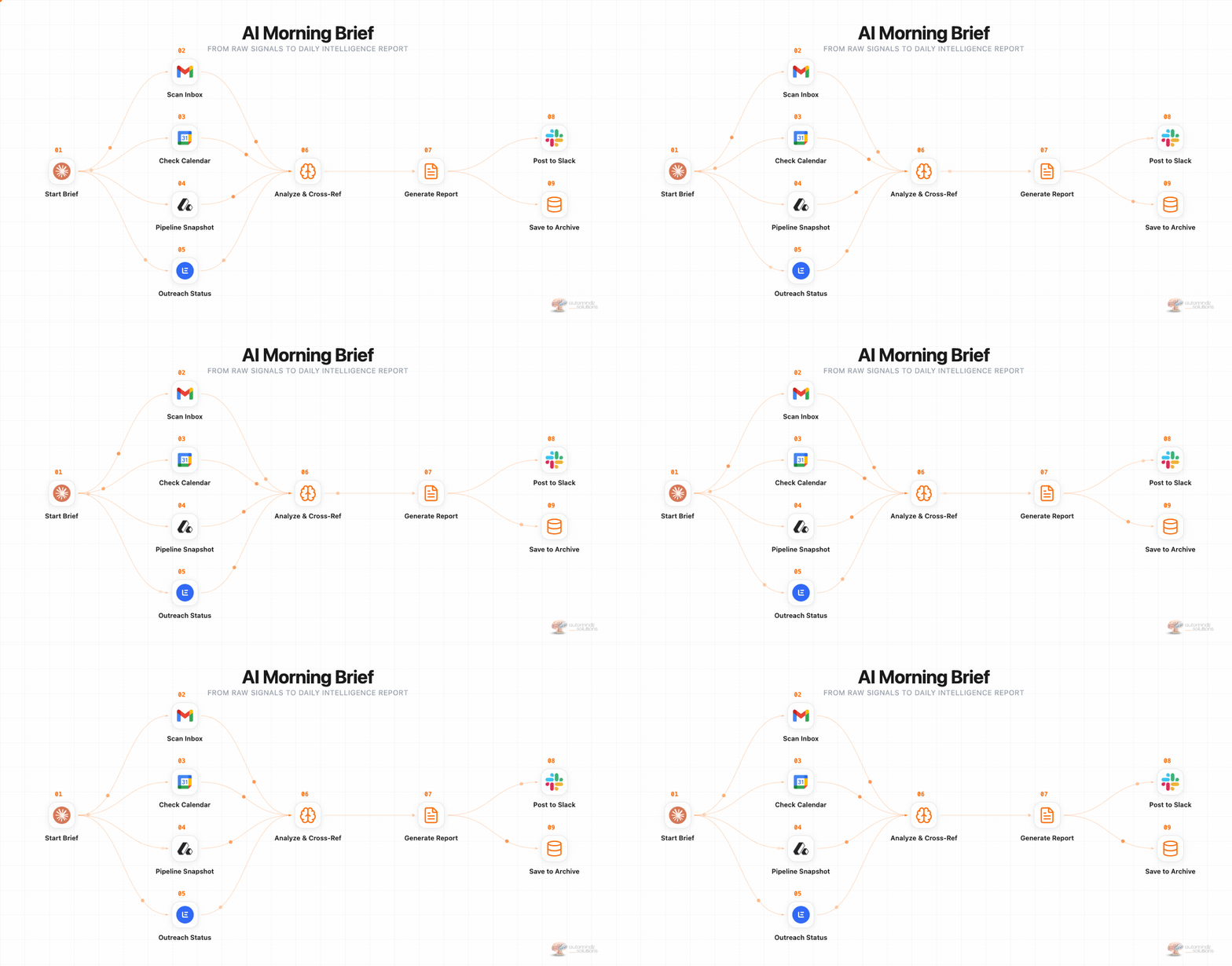
Every morning, I run /admin-morning and get a complete operational briefing. Claude pulls data from nine sources - my calendar, email inbox, CRM pipeline, task board, content pipeline, outreach campaign stats, team activity, and recent call transcripts - and compiles it into a structured briefing I read in two minutes.
Before this skill existed, I would spend 30 minutes jumping between tabs, checking Slack, scanning emails, and trying to piece together what needed my attention. Now I sit down, run one command, and know exactly where to focus.
Pre-Call Research
Thirty minutes before any external meeting, Claude automatically generates an intelligence briefing on the prospect. It pulls their LinkedIn profile, company details, any previous interactions in our CRM, past call notes from Fathom, and relevant case studies from our knowledge base.
When I walk into a call with a recruitment agency founder, I already know their team size, their tech stack, their recent hires, and what they said in our last conversation. That level of preparation used to take 20-30 minutes of manual research per call. Now it runs in the background and pushes the briefing to my phone via Telegram.
Content Creation
The content you see on our LinkedIn, X, and blog does not start from a blank page. We built skills that mine our call transcripts, daily logs, and client results for content angles, then draft posts following my exact voice rules - including an anti-AI-slop filter that catches and rewrites generic AI patterns.
There is a 15,000-word brand voice profile that every content skill reads before writing a single word. It includes banned phrases, structural patterns to avoid, sentence rhythm guidelines, and examples of what my real posts sound like versus what AI-generated content typically looks like. The output is not perfect, but it is about 80% there. I spend 5 minutes editing instead of 30 minutes writing from scratch.
Client Reporting
One of our agency clients was spending 6 hours every week writing progress reports for their clients. Each report required pulling data from multiple sources - their CRM, outreach tools, placement tracking - formatting it into a PDF, and sending it out.
We built one skill that pulls from every data source they already pay for, generates the PDF, and presents it for review. Six hours became three minutes. That is the kind of ROI that makes Claude Code worth 100x its subscription cost.
$50.31B
projected AI implementation services market by 2030 (up from $7.63B in 2026)
Source: Industry Analysis
What Claude Code Looks Like for Recruitment Agencies (A Real Client Workflow)
The examples above are internal - how we use Claude Code to run Automindz. But the real power shows up when you build systems for a specific industry. Recruitment is where we live, so let me walk you through a workflow we build for clients.
The Candidate Matching Pipeline
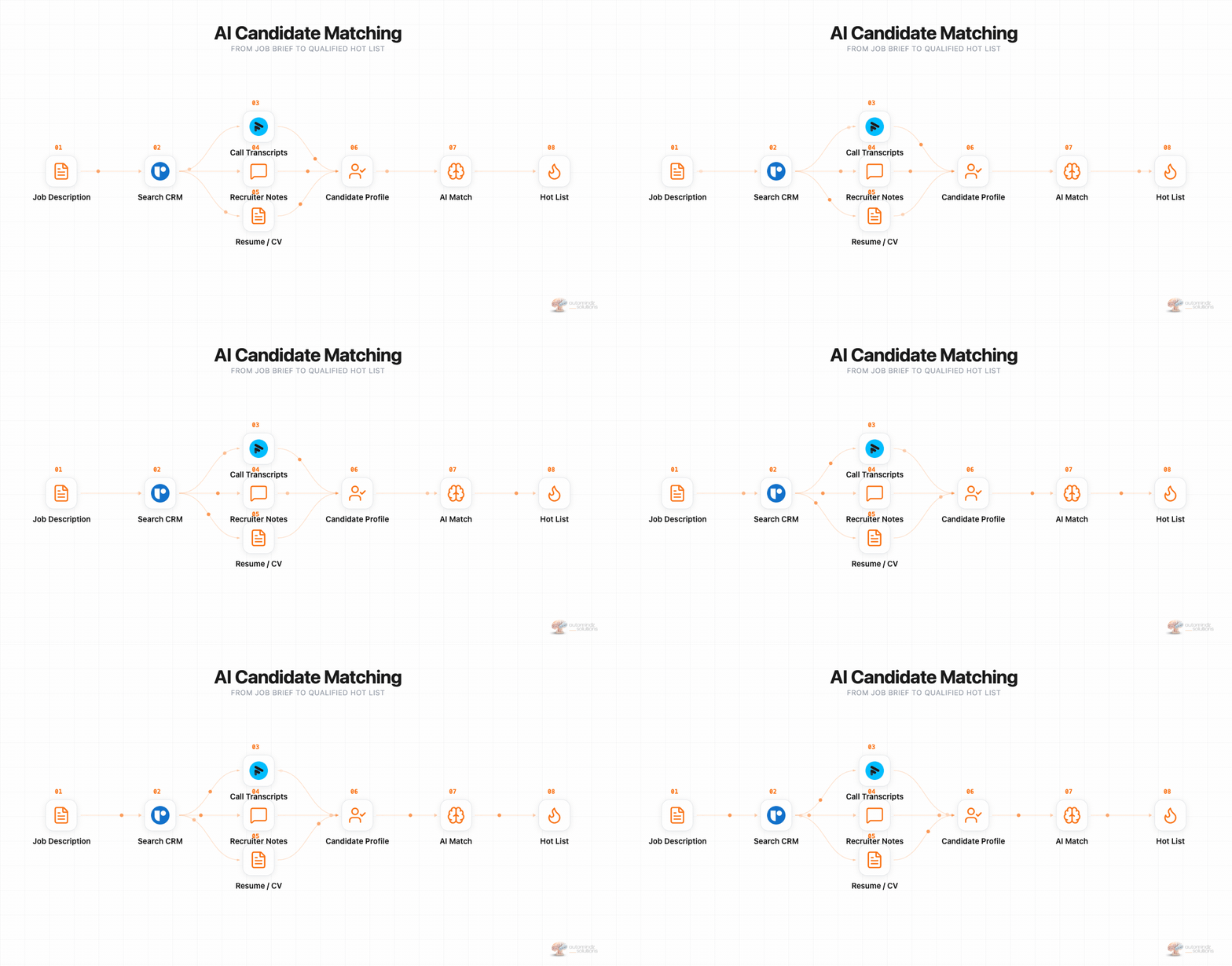
A recruiter enters a new job into their CRM - let's say a Senior Product Designer for a funded SaaS company. That entry triggers a Claude Code skill. From here, everything happens automatically:
-
CRM Search - The skill queries the agency's CRM database for candidates matching specific criteria: job title, experience level, industry background, location, salary expectations. It does not just search tagged fields - it reads CVs, call notes, and previous interview feedback stored in the system.
-
Intelligent Matching - Claude takes each candidate's full profile and matches it against the job description. Not keyword matching - contextual matching. A candidate who worked at a "unicorn" SaaS company and led a design system rebuild gets ranked higher than someone with the right title but no relevant depth. Claude reads the actual CV PDFs and cross-references them with the job requirements.
-
Hot List Generation - The skill produces a scored shortlist with reasoning for each match. Why this candidate fits, what gaps exist, and what the recruiter should probe in a conversation. The recruiter reviews the list and approves the candidates worth reaching out to.
-
Personalized Outreach - For each approved candidate, Claude pulls their profile information, the job description, and any existing relationship data (previous emails, call notes, LinkedIn interactions) and writes an individual outreach message. Not a mail merge with first-name tokens - a genuinely personalized message that references specific details from their background.
-
Campaign Enrollment - The approved messages get enrolled directly into the recruiter's outreach tool - whether that is Lemlist, SourceWhale, or even a standard Gmail or Outlook account. Multi-step sequences with follow-ups, all personalized, all automated.
The recruiter's role shifts from "spend 10 hours manually searching, writing emails, and managing spreadsheets" to "review the shortlist, approve the outreach, and focus on the conversations that matter."
The same flow ships as ready-made hyreflow recipes: crm-matching searches your own ATS first, jd-to-shortlist sources new candidates from a job description, and nothing gets sent or written to your ATS without your approval.
The Agent Team Concept
This single workflow is part of a larger system we call the AI Agent Team. It consists of 10 specialized agents across three divisions:
BD Division - Signal Agent (detects companies hiring), Research Agent (enriches prospects), Outreach Agent (writes and sends personalized sequences)
Sourcing Division - List Builder (overnight sourcing runs), Pre-qual Agent (initial candidate screening), Candidate Outreach Agent (nurture sequences), Brief Writer (turns CVs into polished candidate briefs)
Ops Division - Data Steward (keeps the CRM clean), Reporting Agent (weekly pipeline reports), Watchdog (monitors for errors)
An orchestrator coordinates them all. Data flows from one agent to the next. The List Builder passes candidates to the Pre-qual Agent. The BD Signal Agent feeds targets to the Research Agent. One recruiter with a full Agent Team is doing the work that used to take five people.
For a deeper technical breakdown of how to build an Agent Team for your agency, check out our step-by-step guide.
How to Get Started Today (Step by Step)
You do not need to build a 10-agent system on day one. Start with one real task and expand from there. Here is the path:
Step 1 - Sign up for Claude. Start with the $20/month Pro plan. If you get hooked (you will), upgrade to Max at $100/month for 5x the usage.
Step 2 - Install Claude Code. Download the desktop app for the friendliest interface. Later, install the VS Code extension or use the terminal for more power. Don't be intimidated by the terminal - it is also just a chat window, but it uses fewer credits per interaction and gives you more control. Think of tokens as credits in a game - every message you send and every response Claude gives uses a certain number of credits. Your credit balance refills every 5 hours, so even on the $20 plan you get multiple productive sessions per day.
Step 3 - Write your CLAUDE.md first. This is the step most people skip, and it is the single biggest reason their results are inconsistent. Use voice mode. Talk to Claude for 10 minutes about your business - who you serve, what tools you use, how you work. Ask Claude to draft the CLAUDE.md based on what you said. Review it, adjust it, save it.
Step 4 - Pick one real task from YOUR business. Not a demo project. Not a random app. Something you actually need done - a weekly client report, a prospect research workflow, a data cleanup process. The more real it is, the more the output matters to you, and the faster you will learn.
Step 5 - Use Plan Mode first. Press Shift+Tab to switch to Plan Mode. This is like asking an architect for blueprints before they start building. Claude reads your project, asks clarifying questions, and shows you what it intends to do - without changing a single file. You review the plan, make adjustments, and only then give the green light to build. This prevents Claude from going in a wrong direction on a complex task.
Step 6 - Connect your first MCP server. Pick one tool you use every day - your CRM, your database, your calendar. Run the claude mcp add command, and Claude can now pull data from that tool and act on it. This is where it goes from "helpful chatbot" to "operational team member."
Step 7 - Build your first Skill. After you have done the same task three times with Claude, turn it into a Skill. Create a SKILL.md file with the instructions, save it to .claude/skills/your-skill-name/SKILL.md, and invoke it with /your-skill-name. You just automated a repeatable process.
How Much Does Claude Code Actually Cost?
Claude Code is not a separate product - it is included in your Claude subscription.
| Plan | Price | Claude Code Access | Best For |
|---|---|---|---|
| Pro | $20/month | Included (standard limits) | Getting started, testing |
| Max 5x | $100/month | 5x more usage | Daily business use |
| Max 20x | $200/month | 20x more usage | Heavy automation, teams |
| Team | $20-100/seat/month | Included (Premium seats) | Multi-person teams |
| Enterprise | Custom | Full access + SSO | Organizations |
The Pro plan at $20/month is genuinely enough to get started. You share your credit balance between the Claude chat interface and Claude Code, and it refills every 5 hours. Most business owners I know start on Pro, hit the usage limit within a week, and upgrade to Max.
250%
average ROI on AI automation investments within the first 18 months
Source: AppVerticals Industry ReportThe ROI framing matters here. A typical recruitment agency stacks 5-8 SaaS tools at $200-500/month each. That is $1,000-4,000/month in tool costs before you count the human hours configuring and operating them. Claude Code at $100/month can replace or orchestrate several of those tools while automating the manual work around them.
According to Anthropic's own data from enterprise deployments, the average cost works out to about $150-250 per developer per month. For business owners who are not running it all day, it is significantly less.
What If You Don't Want to Build It Yourself?
Not everyone wants to build their own AI systems. Some business owners want to learn the skill. Others want someone to build it alongside them. Others just want the result without touching any of it. We built three paths for exactly this reason.
AcademyOS - Learn to Build It Yourself
A 6-week cohort-based program where we teach solo recruiters and small agency teams how to build an AI operating system using Claude Code. You leave with a working system - not just knowledge. You write your own CLAUDE.md, build your own Skills, connect your own tools, and deploy real workflows by week six.
This is the path for founders who want to own and understand their AI stack. The skills you learn compound - every workflow you build makes the next one easier.
BuildOS - We Build It With You
For business owners who want specific Claude Code workflows built properly with knowledge transfer. Two 45-minute guided build calls plus done-for-you work between sessions. You walk away with a working system and the understanding of how it works, so you can maintain and extend it yourself.
BuildOS sits between AcademyOS (self-build) and full done-for-you. You get the result faster, with an expert guiding the architecture decisions, but you still learn alongside the build. Check out BuildOS here.
RecruitingOS - Full Done-For-You
The complete AI Agent Team, configured for your niche, deployed on your infrastructure, and maintained by our team. You get a working system - signal-based BD, candidate sourcing, automated outreach, CRM management - without touching any of the technical setup.
This is for agencies that want the result now and would rather invest in implementation than learning. Our typical deployment timeline is 14 days from kickoff to live campaigns generating pipeline. You can learn more about what a Recruiting OS includes on our blog.
Three paths. Same destination - an AI-powered operating system that makes your business run faster with fewer manual hours.
It's not your people. It's your system. Claude Code just happens to be the most powerful tool available right now to build that system - whether you are a developer or a business owner who has never written a line of code.
Frequently Asked Questions
Related Articles

Written by

Niklas Huetzen
CEO & Co-Founder
Niklas leads Automindz Solutions, helping recruitment agencies across the globe build AI-powered pipeline systems that deliver warm meetings on autopilot.
Connect on LinkedIn →Free Resources
Want more like this?
Our Resource Hub is packed with free guides, templates, and tools to help you build AI-powered recruitment pipelines.